
How to Build AI Email Triage That Cleared a 208,619-Email Inbox at US$0.00004 per Email
19 October 2026
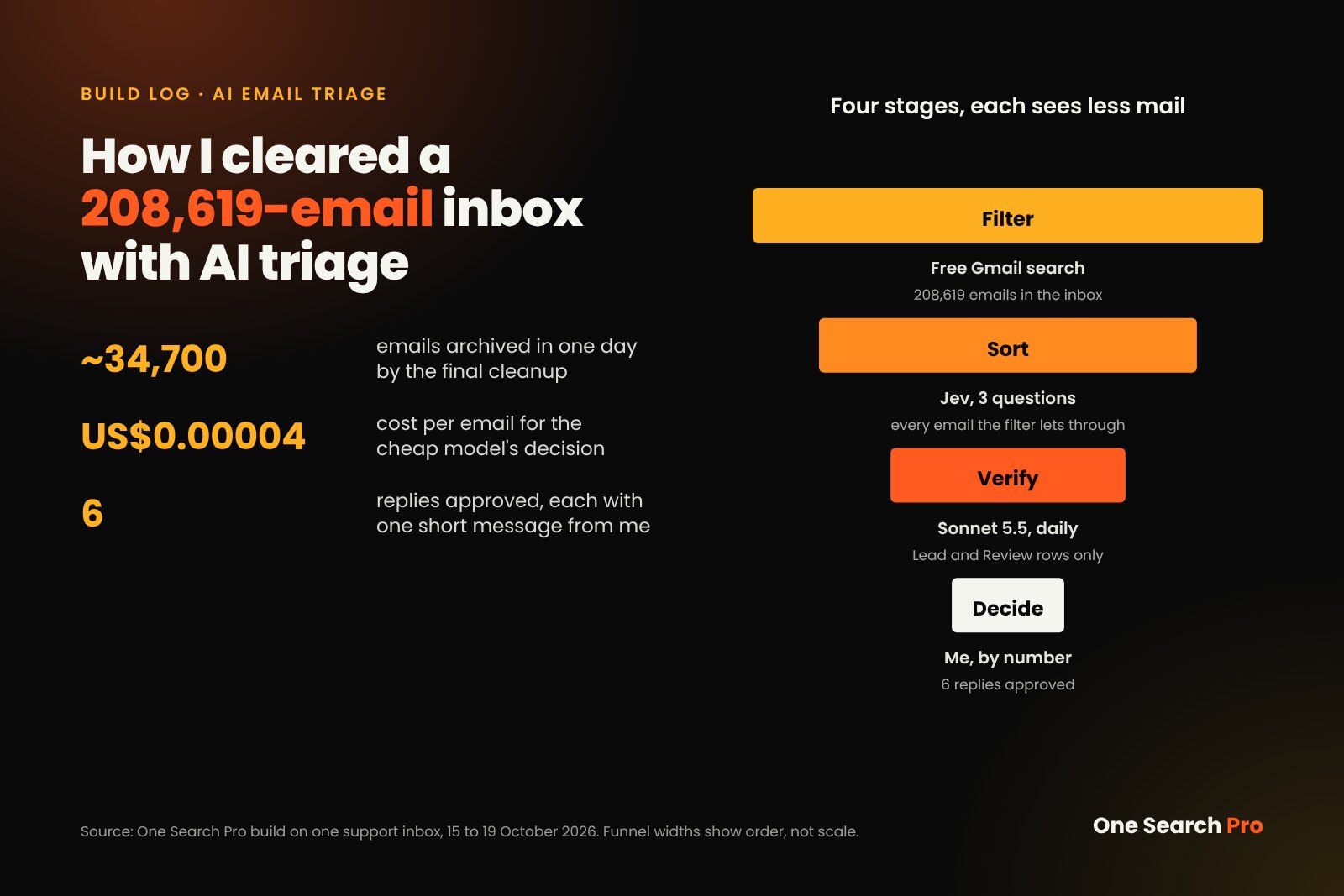
On 15 October 2026, one of my support inboxes held 208,619 messages, and the few sponsored-content enquiries were buried under plugin alerts, pitches and scams. I built AI email triage for it in about 3 hours. By 19 October its final cleanup had archived about 34,700 emails in a single day, and 6 real opportunities had surfaced, each checked twice by AI before reaching me. I approved a reply to all 6.
This guide shows the whole build: Google Apps Script, a cheap decision model called Jev at about US$0.00004 per email, a stronger second check and one human approval step.
| What you build | What it does |
|---|---|
| Free Gmail filter | Removes known noise before any model sees it |
| Cheap model, three questions | Scores every remaining email for about US$0.00004 |
| Routing rules | Sends mail to Lead, Review, Noise or Other, and trashes sure junk |
| Second check | A stronger model reviews only the shortlist |
| Human approval | You send replies by typing their numbers |
Step 1: Funnel Every Form Into One Mailbox and Name One Money Signal
A model cannot find good email until you define what good email is. Decide that before you write any code.

Triage is sorting into a few fixed slots, whether the mail is paper or Gmail. Photo: Airman 1st Class Renee Nicole F. Gamez, U.S. Air Force, via Wikimedia Commons, public domain.

One mailbox. Every contact form on my sites already delivered to a single Google Workspace inbox. The script runs inside that account, so one mailbox means one script, one set of labels and one log.
One money signal. My signal was one yes-or-no question: is the sender offering to pay me to publish something? Guest posts, link insertions, sponsored posts and offers to buy a site all count. Everything else is noise, however polite it sounds.
Where results go. Inflow was about 20 emails every 90 minutes, so leads needed a fixed home. I used three:
- A Gmail star plus a
Jev/Leadlabel - An Airtable table with one row per lead
- A daily 08:51 digest in my project workspace
Step 2: Strip Obvious Noise With Free Gmail Search
The cheapest email to judge is the one you never send to a model. Gmail search is free and already finds most junk, using operators such as category:, older_than: and -in: [4].
List the senders and subjects that are always noise. Mine were WordPress moderation requests, failed plugin alerts, calendar notifications, Gmail Promotions (except mail that mentions a contact form or a guest post) and anything older than 90 days. Each became one line in a config list in triage.gs:
knownNoise: [
  'subject:"Please moderate"',
  'subject:"plugins have failed"',
  '(category:promotions -"sent from a contact form" -"guest post")',
  'older_than:90d',
],
The script uses this list twice. It archives matching inbox mail under a Jev/Filtered label, so nothing is lost. The same terms are also negated in the query that feeds the model, so Jev never pays for known noise.
Archive in bulk. Use the Gmail API’s batchModify, which accepts up to 1,000 message IDs per request [2], instead of moving messages one at a time:
Gmail.Users.Messages.batchModify(
  { ids: ids, addLabelIds: [labels.filtered], removeLabelIds: ['INBOX'] }, 'me');
Enable the Gmail advanced service in the Apps Script editor first. If your script uses a standard Google Cloud project instead of the default one, enable the Gmail API there too. Each list call returns at most 500 IDs, so one batchModify per page stays under the 1,000 cap. Store API keys as script properties, never in the code.
Step 3: Ask a Cheap Model Three Questions
Handing a whole email to a large model and asking it to “categorise” is slow and hard to tune. Ask a cheap model a few narrow questions instead, and keep the decision logic in your own code.
I used Jev (typesafe/jev-1.14) through OpenRouter. It answers structured questions with probabilities, not prose. Each email goes out with its site name, sender, subject and up to 3,000 characters of body.
| Question | Answer type | What it measures |
|---|---|---|
is_link_buyer |
Probability, 0 to 1 | Is the sender asking to publish, place or buy content on this site, paying the owner? |
category |
One of 10 choices, with a confidence and a probability for each choice | Guest post, link insertion, sponsored, buy site, business pitch, SEO pitch, product spam, scam, reader, other |
lead_quality |
Score, 0 to 5 | From “spam” up to “agency or brand with a clear brief and budget” |
Write criteria that separate look-alikes. My false criterion for the buyer question says the sender is “selling something to the site owner, spamming, scamming, or writing as a normal reader”. That line keeps SEO agencies pitching services from scoring as buyers.
Cost and speed. Logged costs put Jev at about US$0.00004 per email, or US$0.004 per 100. A long email costs about US$0.0001. Each call returned in under 0.5 seconds, and the script sends 20 at once with UrlFetchApp.fetchAll.
Test before you trust it. A testOne() dry run judges a handful of emails and logs the answers without changing anything. On mine, 5 of 5 junk emails routed correctly.

Free filter, cheap model, four routes, one human approval. Illustration: AI-generated with OpenAI gpt-image-2.5 for One Search Pro.
Step 4: Route With Readable Thresholds and Sum the Junk Categories
Jev gives you numbers, and your routing rules turn them into actions. Keep every threshold in one config block, named in plain words, so you can tune it after a week of real mail.
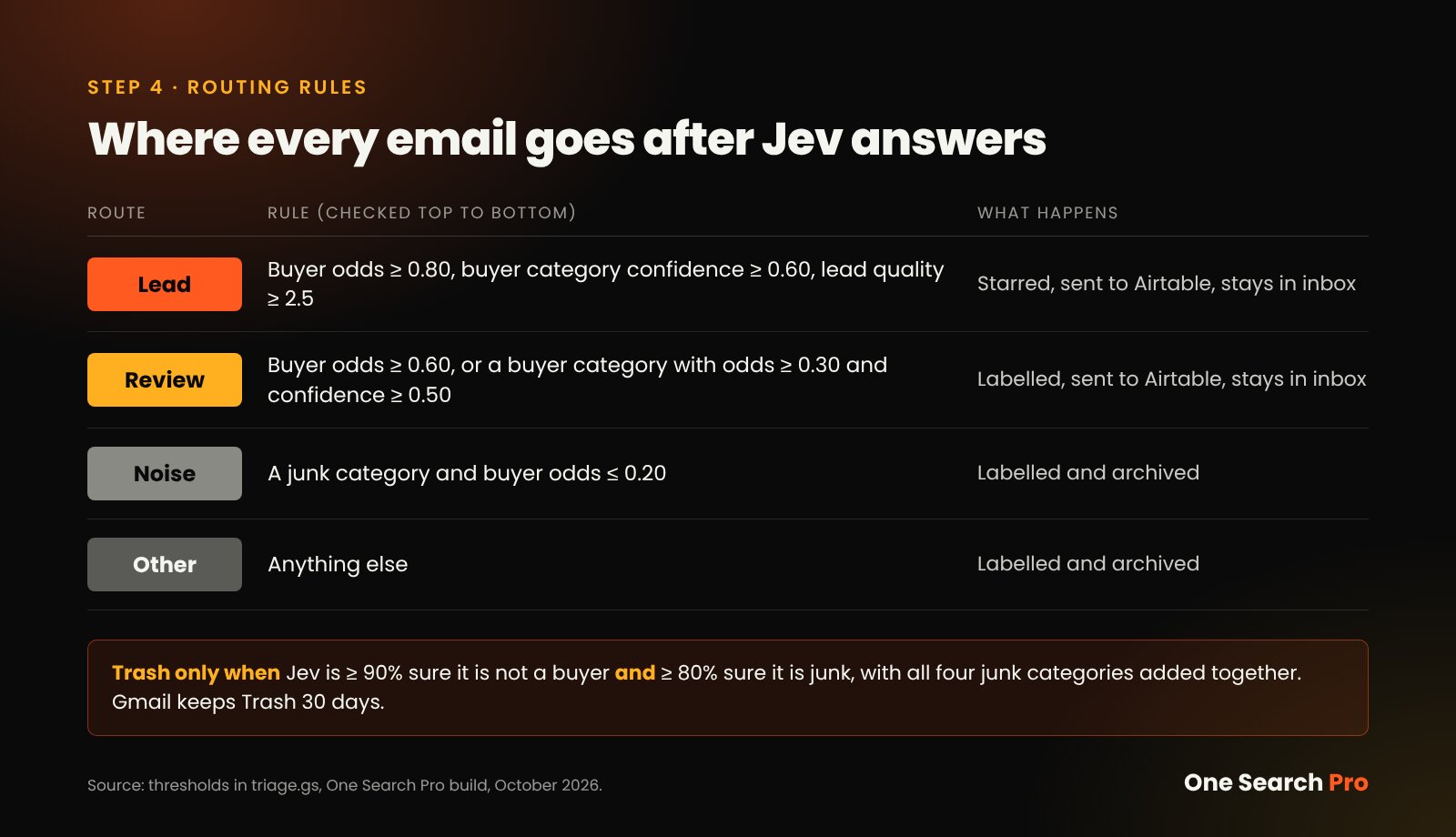
The four routes and the trash rule, checked top to bottom. Image: One Search Pro, from the thresholds in triage.gs.
| Route | Rule in triage.gs |
What happens |
|---|---|---|
| Lead | Buyer probability 0.80 or more, a buyer category at 0.60 confidence or more, and lead quality 2.5 or more | Starred, written to Airtable, stays in inbox |
| Review | Buyer probability 0.60 or more, or a buyer category with buyer probability 0.30 or more and confidence 0.50 or more | Labelled, written to Airtable, stays in inbox |
| Noise | A junk category and buyer probability 0.20 or less | Labelled and archived |
| Other | Anything else | Labelled and archived |
The trash rule. An email goes to Gmail Trash only when Jev is 90% or more sure it is not a buyer and 80% or more sure it is junk. Gmail keeps Trash for 30 days before deleting it permanently [3]. The script itself never deletes anything outright.
Sum the junk. The 80% bar is measured across all four junk categories added together, not the top one alone:
const junk = NOISE_CATEGORIES.reduce((sum, c) => sum + (probs[c] || 0), 0);The reason: 69% product spam plus 26% scam is 95% junk, even though neither alone clears 80%. Without the sum, obvious spam stays in your inbox because the model split its vote.
Step 5: Clear the Backlog Without Hitting Apps Script Limits
A backlog this size will hit Apps Script’s hard limits unless you design around them. These were the figures on Google’s quota page in October 2026, and Google can change them [1]:
| Limit | Free Gmail account | Google Workspace |
|---|---|---|
| Runtime per execution | 6 min | 6 min |
| Trigger runtime per day | 90 min | 6 hr |
| UrlFetch calls per day | 20,000 | 100,000 |
| Email reads and writes per day | 20,000 | 50,000 |
| Triggers per user per script | 20 | 20 |
Every model call is a UrlFetch call, so on a free account 20,000 per day caps how many emails you can judge. That is another reason the free filter in Step 2 matters.
Work in time-boxed runs. The script stops itself at 4.5 minutes, under the 6-minute limit, and logs “Time budget hit”. The next trigger picks up where it left off. Labelling removes mail from the query results, so each loop re-reads the first page instead of paging.
Use two triggers. The main job runs every 15 minutes on mail from the last 2 days. A 90-day backfill runs every 10 minutes and removes its own trigger once it logs “done”.
Lock against overlap. Both jobs share one script lock, so two runs can never judge the same email and write a lead twice:
const lock = LockService.getScriptLock();
if (!lock.tryLock(1000)) {
  Logger.log('Another run is in progress; skipping.');
  return;
}
try {
  // judge and route this batch
} finally {
  lock.releaseLock();
}
With the filter, the lock and batchModify in place, the final cleanup archived about 34,700 emails in one day (15,000, then 347, then 19,384).
Step 6: Add a Stronger Second Check on the Shortlist Only
Cheap models are good at sorting. The final call on whether an email deserves your time is worth a stronger model, but only for the few emails that survive.
Once a day, Sonnet 5.5 reads the Lead and Review rows in Airtable. It deletes weak rows and drafts a reply for each worthy one. Because it only sees the shortlist, its cost does not grow with your spam.
| Stage | Model | Volume | Job |
|---|---|---|---|
| Filter | None (Gmail search) | Everything | Remove known noise for free |
| Sort | Jev | Every remaining email | Three questions, route by thresholds |
| Verify | Sonnet 5.5 | Lead and Review rows only | Delete weak rows, draft replies |
| Decide | Me | A handful a day | Approve or ignore |
Close the loop in Gmail. A deleted row leaves its email in the inbox. The script archives any Lead or Review email older than 3 days, because Airtable is now the work queue.
Step 7: Keep a Human on Send by Approving by Number
Automating the reading is safe. Automating the replying is where a bad rule costs you a client or your sender reputation.
Each daily digest lists the drafted replies with numbers. I approve with one message, for example “send 1 2”, which ticks a “Send Approved” box on those Airtable rows.
Every 15-minute run first sends rows where Send Approved is ticked and “Sent At” is blank, then stamps Sent At so nothing goes out twice:
"AND({Send Approved}, {Sent At} = '', {Sender Email} != '', {Draft Reply} != '')"That is how 6 replies went out, each with one short message from me. Whether any of them becomes a deal is still open.
What Broke, and How I Fixed It
Jev’s raw judgements were right from the start. Every miss sat in the routing rules around it, which is where human review time paid off.
| What broke | Evidence | Fix |
|---|---|---|
| One investor-outreach template flooded Airtable | 20 of the first 25 rows, sent through 20 different sites | Pre-filtered the template; made “business pitch” its own junk category |
| Review triggered on category alone | Rows reached Review at 4 to 14% buyer odds | Review now also needs buyer signal (0.30 or more with a buyer category) |
| SEO pitches stayed in the inbox | AI-traffic pitches scored 97 to 99% “SEO pitch” but were not counted as junk | SEO pitches now count as junk |
| Split junk votes missed the trash bar | 69% plus 26% across two junk categories missed the 80% bar | Junk probability summed across all junk categories |
| My own replies came back as leads | Sent replies matched the lead query | Added -in:sent to the Gmail query |
| Promotions and old mail never left | Promotions was skipped, and mail over 90 days needed a manual run | Both archived on every run under Jev/Filtered |
| Weak Review mail stayed in the inbox | The daily check deleted the row but not the email | Lead and Review mail archived after 3 days |
| Metric | Value |
|---|---|
| Inbox on 15 Oct 2026 | 208,619 messages |
| Real opportunities surfaced | 6, each checked by Jev and then by Sonnet 5.5 |
| Archived by the final cleanup | About 34,700 in one day |
| Replies approved and sent | 6 |
| Jev cost per email | About US$0.00004 |
| Build time | About 3 hours, same day |
| Deleted for good by the script | Nothing; archives are labelled and Trash keeps junk 30 days |
The inbox now holds only new Lead or Review mail from the last 3 days. Inbox zero came from routing rules around a cheap model, not from a smarter model.
Two weeks in: the label counts
On 29 October 2026, two weeks after launch, the Gmail labels showed how much each route had handled. The counts include mail that arrived after 15 October, so together they come to more than the 208,619 starting total. Lead, Review, Noise and Other add up to the 18,768 judged by Jev.
| Label | Emails | What it means |
|---|---|---|
| Judged by Jev | 18,768 | Emails the model read and labelled |
| Lead | 1 | Clear buyer, starred for me |
| Review | 371 | Possible buyer, checked again by the daily Sonnet 5.5 pass |
| Noise | 5,059 | Junk, archived or trashed |
| Other | 13,337 | Not junk and not a buyer, archived |
| Filtered for free | 105,407 | Known noise archived by Gmail search, no model call |
| Older than 90 days | 103,866 | Archived without review |
At about US$0.00004 each, the 18,768 model calls come to roughly US$0.75. The free filter kept 105,407 emails from ever costing anything, which is why it is Step 2 and not an afterthought.
If your team is buried in website enquiries and wants a system like this built around your own sales signal, talk to One Search Pro.
Sources
- Google, “Quotas for Google Services”, Apps Script documentation: https://developers.google.com/apps-script/guides/services/quotas
- Google, “Method: users.messages.batchModify”, Gmail API reference: https://developers.google.com/workspace/gmail/api/reference/rest/v1/users.messages/batchModify
- Google, “Delete or recover deleted Gmail messages”, Gmail Help: https://support.google.com/mail/answer/7401
- Google, “Search operators you can use with Gmail”, Gmail Help: https://support.google.com/mail/answer/7190
- First-party data: execution logs, Airtable records, cost logs and Gmail label counts from my own build, 15 to 29 October 2026. The inbox and senders are kept private.
Frequently asked questions
How much does AI email triage cost to run?
In my build, Jev cost about US$0.00004 per email, or US$0.004 per 100, with long emails near US$0.0001. Apps Script itself is free within its quotas. Free Gmail filters remove known noise before any paid call, and the stronger model runs once a day on the shortlist only. So your cost tracks the mail that survives the filter, not your full spam volume.
Is it safe to send my emails to an AI model?
Each email's sender, subject and up to 3,000 characters of body go to the model provider through its API, so review that provider's data policy before you build. Keep API keys in script properties, never in code. In my build the script never deletes mail outright: noise is archived with a label, and sure junk goes to Trash, which Gmail keeps for 30 days.
How accurate is a cheap model at email triage?
In my dry run, Jev routed 5 of 5 junk emails correctly, and its raw judgements held up during tuning. Every error I found came from my routing rules, such as sending mail to Review on category alone or not summing junk categories. Plan a week of checking the Review label, then adjust thresholds. A stronger second check on the shortlist catches what remains.
Do I need Google Workspace, or does free Gmail work?
Free Gmail works for small inboxes, but the limits are tighter. Free accounts get 90 minutes of trigger runtime and 20,000 UrlFetch calls per day, while Workspace gets 6 hours and 100,000. Both cap a single run at 6 minutes. For a large backlog, Workspace finishes faster, and a strong free Gmail filter matters even more on a free account.
Can I use a different model instead of Jev?
Yes, the pattern does not depend on Jev. You need a cheap model that returns structured answers, ideally probabilities, for a few narrow questions. Keep the thresholds in your own code so you can swap models without rewriting the logic. Then add a stronger model as a second check on the shortlist only, and keep a human approving every send.