

Introduction: Why is SEO Website Design Important
Gone are the days when having a pretty website was enough. Now your site needs to impress both human visitors and search engines like Google.
Website design and SEO go hand in hand like peanut butter and jelly. A well-designed website isn’t just about looking good—it actually helps search engines understand and rank your content better. Effective collaboration between SEO strategies and web design elements can enhance user experience, improve readability, and ultimately lead to better search engine rankings.
Think about it: when you visit a website that loads slowly or looks terrible on your phone, you bounce right back to search results. Google notices that behavior!
Search engines have become smarter. They don’t just scan text anymore; they evaluate the entire user experience. Your site’s structure, navigation, and loading speed all factor into how Google ranks you.
Incorporating SEO friendly web design is crucial for creating websites that rank well in search engine results while providing a positive user experience.
How A Website Design Affects SEO Performance
Your website design isn’t just about looking pretty—it’s a crucial factor in how well your site performs in search rankings.
Think of design as the silent partner working behind the scenes to boost (or tank) your SEO efforts.
User experience and SEO are actually besties. When visitors enjoy using your site, they stay longer, engage more, and bounce less—all signals that tell Google your content is valuable.
Navigation structure matters tremendously. Clean, intuitive menus help users find what they need without frustration. Search engines track how easily people move through your site, and clunky navigation can hurt your rankings.
Mobile-friendliness is non-negotiable in 2025. Google primarily uses mobile versions of sites for indexing and ranking, so if your design breaks on smartphones, you’re in SEO trouble.
Page speed is another design element that directly impacts SEO. Fancy design elements might look cool but can slow loading times. Each second of delay increases bounce rates by 32%!
Key design elements affecting SEO include:
- Site architecture and URL structure
- Image optimization (size, alt text, format)
- Responsive design across all devices
- Strategic placement of content
- Proper use of headers (H1, H2, etc.)
Typography and color choices influence readability, which affects how long visitors engage with your content. More time on page? Better SEO signals!
Smart web designers build sites with both humans and search engines in mind. The best designs create seamless experiences that naturally boost the technical SEO factors search engines love.
Read more: Best Website Builders for SEO
SEO Friendly Web Design: The Best Practices For Optimal SEO Performance
Building a website that looks great is only half the battle. You need to ensure search engines can find and love your site too.
Achieving a high ranking in search results is crucial, as the first search result garners a significant percentage of clicks, which decreases rapidly for lower rankings. Many website owners overlook crucial SEO elements during the design phase, setting themselves up for ranking disappointments later. The foundation of SEO success is laid during website development.
Mobile Friendliness

Through Google Search Console, you can check the mobile compatibility and issues your website might be facing when viewed on a mobile phone.
Gone are the days when people only browsed websites on desktops. Today, over 60% of searches happen on mobile devices, making mobile-friendliness non-negotiable for your SEO strategy. Google has shifted to mobile-first indexing, meaning it primarily uses the mobile version of your site for ranking and indexing.
Your website needs to look good and function well on smaller screens. This means responsive design that automatically adjusts to different screen sizes, readable text without zooming, and touch-friendly navigation. A site that forces users to pinch and zoom will drive visitors away faster than you can say “bounce rate.”
Site speed matters even more on mobile. Users on smartphones often have less patience and may be using slower connections. Optimize images, minimize code, and eliminate unnecessary elements that slow down loading times. Google’s PageSpeed Insights tool can help identify what’s slowing your mobile site down.
Mobile SEO Best Practices:
- Use responsive design that adapts to any device
- Ensure buttons and links are large enough for finger tapping
- Keep forms simple and easy to complete on small screens
- Avoid pop-ups that are difficult to close on mobile
- Test your site on multiple devices regularly
Speed Of Website

Pingdom has an online speed checker where it determines the speed of your website and also grades it based on key metrics.
Website speed isn’t just a techie’s obsession—it’s absolutely critical for your SEO success in 2025. Google has made it crystal clear that faster websites get preferential treatment in search rankings. When your pages load quickly, Google’s crawler bots can efficiently index your content, giving you a nice edge over slower competitors.
Your users expect lightning-fast experiences too. Did you know the average website takes about 8.6 seconds to load on mobile devices? That’s way too slow! Sites ranking on Google’s first page typically load much faster, showing a direct correlation between speed and rankings.
Page speed impacts three crucial areas: your search rankings, user experience, and conversion rates. A one-second delay in page response can result in fewer page views and a drop in conversions. Try using free tools like PageSpeed Insights or Pingdom’s Website Speed Test to check your current performance and identify issues that need fixing.
Here are quick wins to boost your site speed:
- Optimize images (compress without sacrificing quality)
- Enable browser caching (so repeat visitors load pages faster)
- Minify CSS and JavaScript files (remove unnecessary characters)
- Use a Content Delivery Network (CDN)
- Reduce server response time (consider better hosting)
Proper Website Architecture
Ever looked at a messy closet and thought, “I can’t find anything in here!”? That’s exactly how visitors feel when they land on a poorly structured website. Good website architecture isn’t just about making things pretty—it’s about creating a logical pathway for both users and search engines to follow.
Website architecture refers to how you organize and connect the pages within your site. Think of it as building a pyramid with your homepage at the top, followed by main categories, then subcategories, and finally individual pages. This hierarchy helps Google understand what your site is about and which content matters most.
Your menu and breadcrumbs are like the GPS of your website, guiding visitors to their destination without frustration. A flat structure (where pages are just a few clicks from the homepage) makes your content more accessible to both humans and search engine crawlers. Remember, when Google’s bots can easily crawl your site, you’re more likely to earn those coveted higher rankings!
Key Elements of Proper Architecture:
- Clear navigation menus with logical categories
- Strategic internal linking between related content
- Simple, consistent URL structure that makes each web page URL readable and relevant
- Mobile-friendly design that adapts to all devices
Don’t overwhelm your visitors by linking to too many pages from your homepage or stuffing your menu with options. Keep things simple!
Optimal URL Structure, Meta Tags, And Meta Descriptions

Less is more. Using a simple URL structure can potentially improve click-through-rate (CTR). Source: Google Search Central
Ever clicked on a web address that looked like alphabet soup?
URL structure is more than just technical mumbo-jumbo—it’s your website’s digital handshake with both users and search engines. A clean, logical URL tells visitors exactly what they’ll find when they click. Think of it as your page’s first impression!
Your URLs should be short, descriptive, and keyword-rich without going overboard. Use hyphens to separate words (like-this-example) instead of underscores or nothing at all. HTTPS is non-negotiable in 2025—without that little padlock icon, visitors won’t trust your site with their information or their clicks.
Meta tags work alongside your URLs to boost your SEO game. Your title tag should contain your main keyword while staying under 60 characters to avoid truncation in search results.
A compelling meta description (under 160 characters) acts like a mini-advertisement on search engine results pages. When crafted with care, these snippets can dramatically improve your click-through rates even if you’re not ranking #1!
Organizing your web pages effectively through well-structured URLs and meta tags helps both users and search engines understand your content better, improving discoverability and search engine rankings.
Best Practices for URLs:
- Keep URLs short and descriptive
- Use hyphens between words
- Include 1-2 relevant keywords
- Maintain a logical hierarchy
- Always use HTTPS protocol
Meta Tag Essentials:
Element
Length
Purpose
Title Tag
50-60 chars
Primary ranking factor + user’s first impression
Meta Description
150-160 chars
Improves CTR (not direct ranking factor)
URL
Under 100 chars
Helps users and search engines understand page content
Remember to avoid keyword stuffing in both URLs and meta tags. Google’s smart enough to spot that trick, and your users will find it off-putting. Instead, focus on clarity and relevance—your click-through rates will thank you!
An Excellent And Relevant Topic Cluster

A large part of a topic cluster is topic relevancy. It’s important to know what your website is talking about and build on that ecosystem.
Topic clusters are the secret sauce for ranking in 2025’s competitive SEO landscape. They’re groups of related content pieces that orbit around a central “pillar” page, creating a web of topical authority that search engines absolutely love. You can think of them like solar systems – the pillar page is your sun, and the cluster content represents planets circling around it.
Creating effective clusters isn’t just about dumping related keywords together. It’s about structuring content that satisfies user intent at different stages of their journey. For ecommerce sites, clusters might focus on product categories and buying guides. For service businesses, they often revolve around solving specific problems your audience faces.
Here’s a simple structure to follow:
- Identify main topic (pillar content)
- Research related subtopics (cluster content)
- Create comprehensive content for each
- Link everything together logically
The magic happens when you connect these pieces through internal linking. This helps users navigate easily between related topics while signaling to Google that you’re a topical authority. Your pillar content should target broader keywords, while cluster content targets more specific long-tail phrases.
Remember that topic clusters aren’t one-size-fits-all. B2B companies might build deep, technical clusters with white papers and case studies. Consumer brands often succeed with lighter, more visual cluster content that answers common questions.
Tools like Semrush can help you research related keywords and discover topic opportunities that competitors might be missing. You’ll see how terms connect and which subtopics deserve their own dedicated pages within your cluster strategy.
Proper Internal Linking
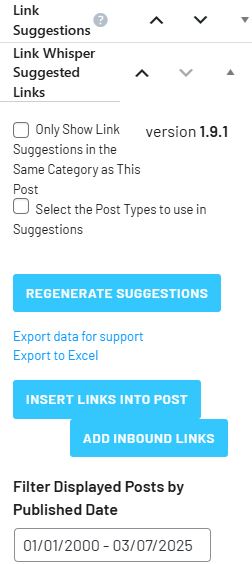
Before publishing an article post, Link Whisper can help determine which internal links are best suited for that article post.
Internal linking is like creating a roadmap for your website visitors and search engines. When you link relevant pages together, you’re showing Google which content is most important and how different topics on your site relate to each other. Think of each link as a vote of confidence for the page it points to.
Good internal linking isn’t just throwing random links everywhere. You want to create a logical structure where your most important pages receive more internal links. This helps distribute “link equity” throughout your site and improves your overall SEO performance.
Here’s how to nail your internal linking strategy:
- Use descriptive anchor text instead of generic “click here” phrases
- Link to relevant content that adds value to what users are reading
- Create a hierarchy with your most important pages receiving more links
- Fix broken internal links regularly to maintain a healthy site structure
The best internal links feel natural within your content. When you’re discussing a topic that’s covered more deeply elsewhere on your site, that’s the perfect opportunity to add a link. These contextual links help users discover more of your content while signaling topic relevance to search engines.
Remember to keep your internal linking structure relatively flat. Users (and Google) should be able to reach any page on your site within 3-4 clicks from the homepage. This improves crawlability and ensures all your valuable content gets discovered and indexed properly.
Content Has The Proper Heading

Headings not only promote significance but also compartmentalise your content properly.
Headings are like signposts guiding visitors through your website’s content. They help both readers and search engines understand what each section is about. When you structure your content with proper headings, you’re essentially creating a roadmap that makes your information more digestible and SEO-friendly.
Your H1 tag should appear only once per page and contain your primary keyword—it’s the main title that tells everyone what your page is about. H2 tags work as section titles (like the one above this paragraph), while H3-H6 tags organize subsections in decreasing order of importance. Each heading should include relevant keywords naturally, not forced or stuffed.
Good heading structure isn’t just about SEO—it dramatically improves accessibility too. Screen readers use headings to navigate content, so a logical hierarchy helps all users. Want to check if you’re doing it right? Scan your page—can you understand what it’s about just by reading the headings? If yes, you’re on the right track! Remember to keep headings concise, descriptive, and free of fluff to maximize their impact on both readers and search rankings.
Creating And Submission Of Sitemap

Sitemaps can usually be created from your website’s backend. Alternatively, you can use a website like XML Sitemaps to help you manually generate one.
A sitemap is your website’s roadmap that guides search engines through all your important pages. Think of it as your website’s GPS for Google! It helps search engines discover and understand your content structure, especially those deep pages that might otherwise go unnoticed.
Creating a sitemap doesn’t have to be complicated. For smaller websites (under 500 pages), you can build one manually by listing all your URLs in XML format. For larger sites, tools like XML-sitemaps.com or plugins for platforms like WordPress can generate them automatically in minutes.
Once your sitemap is ready, it’s time to submit it to search engines. Log into Google Search Console, select your website property, and navigate to the “Index” section. There you’ll find the “Sitemaps” option where you can add your sitemap URL (typically yourdomain.com/sitemap.xml).
The best time to implement a sitemap is right after launching your website or after making significant structural changes. You don’t need to wait! Fresh websites benefit enormously from having sitemaps as they speed up the indexing process.
Pro tip: Update your sitemap whenever you add new pages or change your site structure. Regular updates ensure search engines always have the latest map of your digital territory.
Optimal Image Size

An example of a website that lets you compress images for free is TinyJPG.
Finding the sweet spot for image sizes can make or break your website’s performance. Based on current standards, full-screen images should be at least 2500 pixels wide, while standard web images perform best at 72 ppi (pixels per inch). This resolution renders well across all devices while keeping file sizes manageable.
For SEO purposes, keep your image files under 0.5 MB whenever possible. Large image files slow down page loading times, which can hurt your search rankings and frustrate visitors who bounce before your content even loads. You can use image compression tools to shrink file sizes without sacrificing visual quality.
Don’t forget to include proper dimensions in your image HTML tags! When you specify width and height attributes, browsers can allocate space for images before they load, preventing layout shifts that harm user experience. Pair this with descriptive alt text containing relevant keywords, and you’ve got images that work double-duty—pleasing both human visitors and search engine crawlers.
Best practices for image optimization:
- Resize images before uploading (don’t rely on CSS scaling)
- Use JPG for photographs, PNG for graphics with transparency
- Compress all images to reduce file size
- Include descriptive alt text with keywords
- Add proper image dimensions in HTML
Have A Clean And Structured Page Code
This video by Wes Bos perfectly showcases how web speed and intuitiveness in a website can be achieved by proper-clean HTML coding.
Clean code isn’t just developer jargon—it’s the secret sauce that makes your website irresistible to search engines. Think of Google’s crawlers as picky eaters; they prefer simple, well-organized meals rather than a chaotic buffet of jumbled code. When your HTML, CSS, and JavaScript are neatly structured, search engines can easily digest what your site is all about.
Speed matters more than you might think! A site bogged down by bloated code forces visitors to wait, and nobody’s got time for that in 2025. By moving CSS to external stylesheets and JavaScript to separate files, you’ll slim down your pages significantly. Your reward? Faster load times, happier users, and a nice SEO boost since page speed is a ranking factor.
Here’s what makes for clean, SEO-friendly code:
- Semantic HTML5 tags (header, nav, article) that clearly define content sections
- Minified CSS and JavaScript files to reduce file size
- Proper indentation for easier debugging
- Limited use of inline styles or script tags
- Removal of commented-out code and unused markup
Tools To Help With SEO Website Design
Designing an SEO-friendly website doesn’t have to feel like rocket science—you’ve got plenty of digital helpers waiting in the wings! The right tools can transform your website from an invisible corner of the internet into a discovery magnet that search engines absolutely adore. From analyzing your competitors to tracking your rankings, these digital assistants make the technical side of SEO much more manageable.
Your ideal toolbox might contain a mix of platform-specific features and standalone tools. The perfect combination depends on your technical comfort level and specific website needs.
Ahrefs: Site Audit

By using Ahrefs’ Site Audit function, you can get a quick and detailed overview of your website’s current health and status.
Ahrefs Site Audit is like having an SEO detective scan your entire website for clues about what’s holding you back. The tool checks every page for more than 170 technical and on-page SEO issues without requiring any installation or advanced knowledge. You simply point it at your website, and it starts crawling like a diligent little spider.
What makes this tool stand out is how it uncovers hidden problems that most site owners miss. Found a strange traffic drop? Ahrefs might spot those pesky duplicate content issues that are confusing search engines. Got pages that Google refuses to index? The audit will flag content with canonical tag problems or robots.txt blockages.
The best part is how it organizes everything into an actionable report with severity ratings. You’ll see exactly which issues need immediate attention versus those that can wait until your next coffee break.
Screaming Frog: Site Structure Optimization
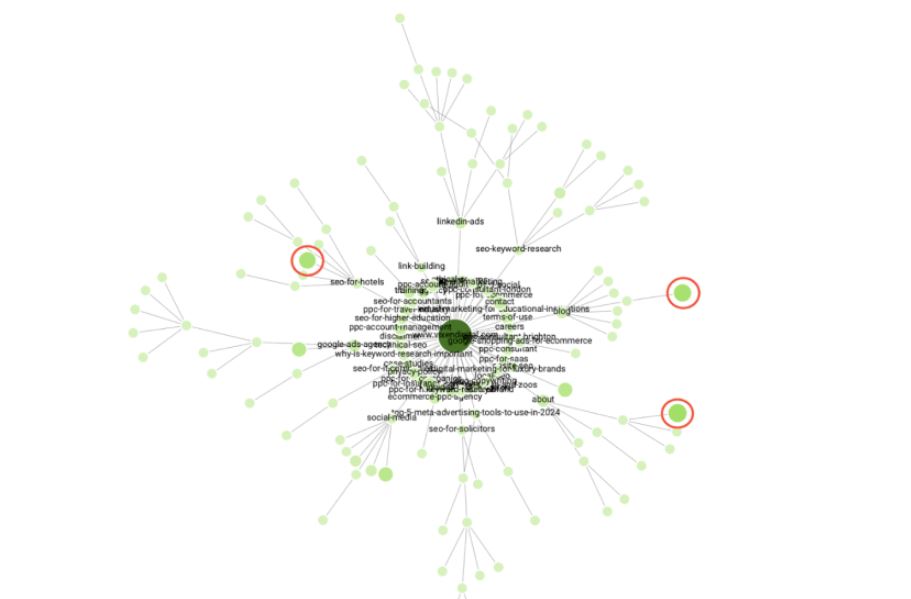
Screaming Frog has a visualisation tool that maps out your entire website structure where you can see pages that are interconnected with one another.
Screaming Frog SEO Spider takes the mystery out of site structure with its powerful visualization tools. You can see your entire website mapped out before your eyes, revealing how pages connect to one another through interactive crawl visualizations and directory tree diagrams. These visual representations quickly highlight orphaned pages, excessive clicking depths, and problematic navigation patterns that might be hurting your SEO.
Your internal linking strategy becomes crystal clear when you can actually see how authority flows through your site. Screaming Frog helps you identify opportunities to strengthen connection between important pages and discover structural weaknesses that need fixing. You’ll spot duplicate content issues, redirect chains, and navigation dead-ends that might be confusing both users and search engines.
Best of all, you can analyze up to 500 URLs for free with the basic version. The full-featured version unlocks unlimited crawling capability for larger sites, making it suitable for websites of any size. By regularly checking your site structure with Screaming Frog, you’ll maintain a clean, logical architecture that both users and search engines can easily navigate – a fundamental aspect of strong SEO performance.
Google PageSpeed Insights

Google’s Page Speed Insights allow you to test your website’s speed to know whether is optimal for users.
Google PageSpeed Insights is a free tool that analyzes your website’s performance and spits out a score from 0-100. Poor scores? You’re likely losing visitors faster than free samples disappear at Costco. It measures both mobile and desktop performance, which matters since Google primarily uses mobile-first indexing for rankings.
What makes this tool particularly helpful is its specific recommendations for improvements. You’ll get actionable advice on compressing images, leveraging browser caching, and eliminating render-blocking resources. These aren’t just random suggestions—they directly impact your site’s loading speed and, consequently, your search rankings.
The data comes straight from Chrome User Experience Report, giving you real-world insights about how actual users experience your site. When optimizing for SEO, focus on Core Web Vitals: Largest Contentful Paint (content loading speed), First Input Delay (interactivity), and Cumulative Layout Shift (visual stability). Improving these metrics not only boosts your PageSpeed score but also enhances user experience and can lift your position in search results.
Wrapping Up
Building an SEO-friendly website isn’t rocket science, but it does require attention to detail and a strategic approach. You’ve now got the tools to create a site that both users and search engines will love.
Now that you’re up to speed with SEO-driven website design practices, you’re well on your way to perfecting your website for the best SEO performance! And we do understand if you don’t want to get your hands dirty so if you are in need of SEO experts to help you with your website, feel free to contact us at One Search Pro Marketing here!