

First And Foremost: What Is A Subdomain And Its SEO?
A subdomain is like a branch extending from your main website tree. You build it by attaching a word or phrase before your primary domain—think of “blog.example.com” or “store.example.com.” That part before the dot, such as “blog,” is the subdomain.
A domain name is made up of several components: the second-level domain (the core identifier, like “example”), the top-level domain (such as “.com”), and any subdomains (like “blog” or “store”) that precede them. Subdomains fit into the overall domain structure by extending the root domain, allowing you to create distinct sections within the same domain name.
Unlike adding a simple page or folder, a subdomain creates a distinct area with its own content, design, and sometimes even a different backend system. You might recognize this setup if you’ve seen “support.google.com” for Google’s help center, or if you’ve run a separate online store alongside your main site. Deciding between a subdomain and a subfolder is often part of planning your website design before the build starts.
The main Google domain, “google.com,” uses subdomains like “maps.google.com” and “earth.google.com” to host different services under the same root domain.
Here’s a quick overview of how a subdomain works:
Structure
Example
Purpose
Subdomain.Domain.com
support.example.com
Customer support section
shop.Domain.com
shop.example.com
E-commerce or product area
en.Domain.com
en.example.com
English/language versions
Subdomains are part of the same domain name, and domain names themselves are composed of the second-level domain and top-level domain. This structure allows you to organize your website content efficiently.
Subdomains are handy when you want to organize large or complex websites, test new ideas, or target different audiences. You’re not limited to just one—your company might have a blog, shop, or forum, each separated by its own subdomain. Subdomains allow you to create a distinct section within the same domain name, making it easier to manage different types of website content.
It’s important to note the difference between subdomains and subdirectories. Subdirectories are folders housed within the root domain (for example, “example.com/blog”), while subdomains (like “blog.example.com”) are treated as separate entities in domain structures. This distinction affects how search engines view and rank your site, as subdomains can be seen as distinct sections apart from the main site.
From my own projects, separating a client’s main business site from their resource library using a subdomain made it easier to manage each part and fine-tune the user experience. If you need a clear divide within your web presence—without buying more domains—subdomains are your friend.
Read more:
How to Become an SEO Expert10 Common Mistakes Beginners Make
Subdomain And SEO: Does It Affect Performance
When you set up a subdomain, you’re carving out a unique section of your site, often used for content that stands apart from your main focus—think support pages, forums, or region-specific content. This is why you’ll see examples like maps.google.com or tv.apple.com, which each serve a distinct purpose.
From an SEO angle, the impact of using subdomains is less about penalties and more about separation. Subdomains affect SEO because search engines often treat them as separate entities, which can impact SEO by requiring distinct optimization strategies for each subdomain. Google indexes subdomains independently, so your subdomain usually doesn’t share SEO “link equity” back to your main domain. That means strong backlinks to your blog.example.com don’t automatically help example.com rank higher for competitive keywords. Using subdomains can also impact a site’s performance in search engine rankings, and SEO tools can help monitor and analyze these effects.
A common situation is companies hosting a blog on a subdomain instead of a subdirectory. If you do this and your blog content is relevant to your main business, the main site might miss out on valuable SEO boosts from the blog’s incoming links.
For those building out content in new languages, launching sub-brands, or testing features, subdomains can make sense. Just remember, your SEO efforts and traffic may be siloed from your primary site.
Quick Reference Table: Subdomain SEO Factors
Factor
Subdomain
Subdirectory
Shares SEO Value
No
Yes
Google Indexing
Separate
Combined
Use Case
Distinct topics, brands, or markets
Integrated content
Google’s official stance, as shared by representatives like John Mueller, is that Google websearch is flexible in handling both subdomains and subdirectories, indexing them separately but recognizing their relationship to the main domain if managed properly.
Careful planning will always beat hasty decisions here. Use a subdomain for genuinely separate content, not just for organizational convenience. The decision to use subdomains should be made on a case-by-case basis, and consulting SEO experts can help determine the best approach for your site’s SEO strategy.
Main Differences Between a Subdomain and a Subdirectory
To many—even SEO enthusiasts—are unable to differentiate between subdomains and subdirectories. To be honest, it is pretty confusing and can be misleading. Take a look at the visual below to get a better grasp at their differences.

SEO Strategies for Subdomain and Subdirectory
While there are distinct differences between subdomains and subdirectories, the SEO approach to both of them is also unique. We’ve taken the liberty of segregating their strategies so you can better build and SEO optimise them:

Pros And Cons Of Building A Subdomain
Building a subdomain comes with clear advantages and some important trade-offs. On the plus side, subdomains let you organize content for a unique purpose, separate from your main site—think support portals or international sections. Subdomains can function as distinct websites or as a separate subdomain for different audiences, services, or regions, allowing you to create tailored brand experiences. This clean separation helps when you want to target specific audiences or experiment with totally different site designs and branding, without impacting your core domain.
Here are some pros and cons when building a subdomain.

Subdomain Pro 1: Improve The On-Site Experience
Creating a subdomain gives you a simple way to organize your website by task or topic. Subdomains play a key role in shaping your website’s structure and overall domain structures, helping to categorize different sections, topics, or product categories. Think about splitting your main site into focused spaces—your blog, your store, and your help center—each with its own clear identity. This structure makes it much easier for people to land right where they need to be, avoiding unnecessary clutter.
If you’ve ever clicked through a website and gotten lost looking for customer support or a product catalog, you know the value of a single-purpose section. Subdomains let you cut out the distractions, streamline navigation, and offer a cleaner, more user-friendly experience for every visitor. For example, using store.yoursite.com can give shoppers quick access to your products, which is especially beneficial for an ecommerce business, by keeping unrelated pages separate and improving SEO performance.
Subdomain Pro 2: Boost Your Domain Authority
Launching a subdomain creates an opportunity to build up a new branch of your site’s influence. When you set up a subdomain—such as blog.example.com or help.example.com—you’re essentially giving yourself a clean slate to target specific topics, audiences, or services without mixing them into the main domain. Organizing website content into subdomains can also help with management and SEO, making it easier to categorize different types of material like blogs, product pages, or support resources.
Subdomain Pro 3: Clear Separation Of Content
Using subdomains is a smart way to keep your website well-organized. Each subdomain acts as a distinct section of the website, serving as a standalone hub for a specific topic or function—think blog.example.com for articles, shop.example.com for your store, and support.example.com for help and resources. Subdomain content should be unique and tailored to the specific purpose of each subdomain.
This structure makes it much easier for users to go straight to the content they want, rather than wading through unrelated pages. Organizing website content into subdomains can improve user experience by making navigation more intuitive. For brands offering different services or targeting varied audiences, this clear separation helps keep things simple and easy for everyone to navigate, while preserving a sense of order across your entire web presence.

Subdomain Con 1: Disrupted User Journey
Switching from your main site to a subdomain often introduces abrupt changes in the URL and design, which can break your user’s momentum. Even if both areas belong to your brand, the shift in appearance or navigation is enough to make visitors pause or question if they’re still in the right place. Subdomains may not always feel like the same website to users, which can disrupt the user journey and create confusion about whether they are still interacting with your main site.
I’ve seen sites where a subdomain for support or blog loads with different menus, layouts, or branding. This confusion makes it harder for users to complete their goals, whether that’s getting information or making a purchase. When users sense this disconnect, they’re more likely to bounce or leave your site out of frustration.
Subdomain Con 2: Mobile Experience Complications
Using a subdomain can sometimes trip up your site’s mobile strategy. You might assume your subdomain inherits all the mobile optimizations of your main site, but in practice, it’s easy for subdomains to fall behind. This gap can show up as slower load times or layouts that don’t adapt well to phones and tablets.
When visitors hit a subdomain that isn’t mobile-friendly, confusion follows. Buttons may overlap, text might shrink, and pinching to zoom becomes the norm—none of which belong in a good user experience. These missteps often push mobile users to abandon your page entirely, simply because navigation feels like more trouble than it’s worth.
Making every part of your site, including subdomains, responsive and fast on mobile isn’t just a technical detail—it’s critical for retention and engagement. If your subdomain lags behind, even strong content can’t save you from losing impatient users.
Subdomain Con 3: Diluted SEO
When you use subdomains, your site’s authority is split across multiple web properties. Some believe subdomains are bad for SEO, but this is not always the case. Subdomains are not inherently subdomains bad, but they can impact SEO if not managed properly. Links and referrals that point to your subdomain generally do not add strength to your main domain. This means your efforts to build up SEO authority need to be duplicated for each subdomain, which can be both time-consuming and less effective. Using SEO tools like Semrush, Moz, or Ahrefs can help you monitor the impact of subdomains on your overall SEO performance and address any issues that arise.
Content Strategy for Subdomains
A successful subdomain isn’t just about technical setup—it’s about having a clear, focused content strategy that supports both the subdomain’s unique goals and the main domain’s overall SEO performance. When planning content for a subdomain, start by defining the specific audience you want to reach and the purpose that subdomain serves. For example, a subdomain dedicated to a blog should target topics and relevant keywords that attract readers interested in your industry, while a support subdomain should focus on helpful guides and troubleshooting content.
Thorough keyword research is essential. Identify the search terms your target audience is using and build your content around those relevant keywords. This not only helps your subdomain rank higher in search engines but also drives qualified traffic that’s more likely to engage with your site and convert. High-quality, original content tailored to the subdomain’s niche will help establish authority and trust, which in turn benefits the primary site.
Consistency is key—align your subdomain’s content strategy with the main domain’s messaging and values. This unified approach reinforces your brand and ensures users have a seamless experience, no matter which part of your site they visit. Ultimately, a well-executed content strategy for subdomains can expand your reach, strengthen your domain’s presence, and support your broader SEO goals.
Branding and Consistency Across Subdomains
When your business operates multiple subdomains, maintaining consistent branding is a crucial factor for building trust and recognition. Every subdomain should reflect the same visual identity as your main site—think logos, color palettes, fonts, and imagery. This visual consistency reassures visitors that they’re still interacting with the main brand, even if they’re exploring different sections of your domain.
But branding goes beyond just looks. The tone of voice, messaging, and overall user experience should also align across all subdomains and the primary domain. Establishing clear brand guidelines helps everyone involved—designers, writers, and developers—stay on the same page, ensuring that every subdomain supports the main brand’s vision and values.
Consistent branding across multiple subdomains not only strengthens brand recognition but also creates a seamless journey for users moving between different parts of your site. This unified approach makes your business appear more professional and trustworthy, encouraging visitors to engage with your content and return to your site in the future.
International Expansion with Subdomains
Expanding your business into different countries or regions? Subdomains offer a smart way to tailor your website for international markets while keeping everything connected to your main domain. By creating country- or language-specific subdomains—like de.example.com for Germany or es.example.com for Spain—you can customize content, currency, and messaging to match the needs of each audience.
This approach makes it easier for search engines to understand which version of your site is intended for which region, improving your visibility in local search results. Optimizing each subdomain with local keywords and relevant content helps you compete more effectively in different countries, while still benefiting from the authority of your main domain.
International subdomains also allow you to address cultural differences, legal requirements, and user preferences, providing a more personalized experience for your global customers. By leveraging subdomains for international expansion, you can grow your reach, strengthen your brand’s presence in new markets, and ensure your site remains relevant and accessible to users around the world.
How To Build A Proper Subdomain For SEO
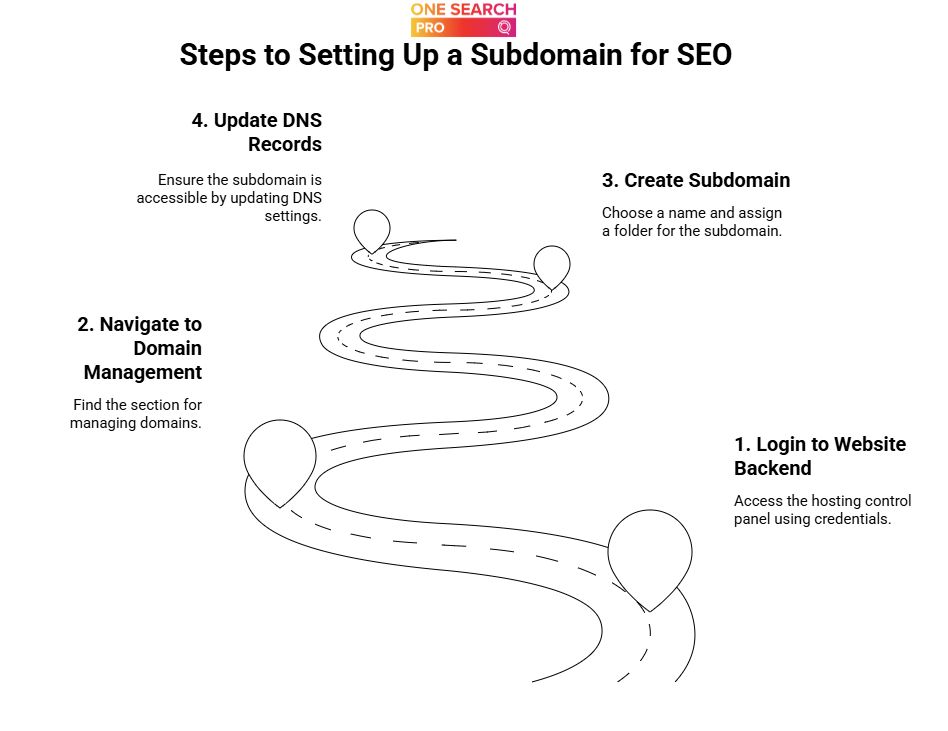
To build a subdomain that performs well in search, start by choosing a name that accurately reflects its specific purpose—whether it’s blog, store, help, or a country code. Keep it simple and intuitive. When naming your subdomain, remember that the second-level domain is the core identifier of your website within the URL structure, sitting just before the top-level domain (like .com) and distinguishing your brand from others. I’ve seen countless sites confuse users and search engines alike just by getting too creative with subdomain naming.
Here are the simple steps to building a subdomain:
Step 1: Login To Your Website’s Backend
Start by signing in to your website’s backend using your credentials. This is usually your hosting provider’s control panel, like cPanel, Plesk, or a custom dashboard interface. You will need access to your hosting account to manage subdomains and related settings. If you have two-factor authentication enabled, keep your phone handy.
Once inside, look for the section labeled “Domains” or “Domain Management.” In most dashboards, it’s not far from the main menu or can be found after a quick scroll.
Navigating these menus might feel different depending on your provider, but most modern hosts make it relatively painless. If you haven’t explored this area before, you’ll notice that everything related to domains—including subdomains—will be organized here.
Step 2: Create A Subdomain
To set up a subdomain, start by selecting a distinct name that reflects the purpose of the new section—such as blog, shop, or support. Enter this subdomain prefix and pick the primary domain you want it to branch from. For example, you might create store.yoursite.com if you’re launching an online shop.
Once you’ve chosen the name, your web host or control panel will ask you to assign a folder—also called a document root—where all the new subdomain’s files will live. These files are folder housed within your hosting account, meaning the subdomain’s content is organized in a specific directory under your main website’s hierarchy. Think of this as designating a space just for your new site area. From personal experience, I recommend labeling folders clearly (/public_html/store) so things stay neat and manageable as your site grows.
Step 3: Update DNS Records
Once your subdomain is created, the next move is updating your DNS records to ensure the world can actually find it. This step tells browsers and search engines where to direct visitors when they enter your subdomain address. I’ve seen new site owners forget this, and their subdomains end up lost in limbo—don’t let that be you.
Log into your DNS provider or hosting control panel. Add a new DNS record for the subdomain, such as an A record (pointing to an IP address) or a CNAME record (pointing to another domain or hostname).
Comparison: Subdomain Vs. Subdirectory

Subdomains and subdirectories are two common ways to organize your website. Both are part of the same domain name and contribute to your website’s structure. A subdomain splits your site at the front—like blog.example.com. A subdirectory keeps everything under your main domain—such as example.com/blog.
When To Implement And Create A Subdomain
You should create a subdomain when you want to clearly separate a section of your website that serves a distinct purpose, audience, or functionality. Creating a separate subdomain allows you to establish a distinct section for specific audiences, services, or regions. This is useful if you need a space for content that shouldn’t blend with your main site—for example, launching a support portal or an e-commerce area.
If your business is expanding into a new region or language, subdomains such as fr.example.com make localization cleaner and simplify targeting for search engines. Subdomains can be used to target certain countries or different regions, helping you optimize content for local audiences and improve SEO rankings in those areas. This approach is especially handy for international websites, as it allows you to optimize content for specific countries or user groups.
Another practical scenario is when you want to run a blog or community on a different platform or content management system. Moving this section to blog.example.com gives you more flexibility and freedom without interfering with your core website infrastructure.
Consider a subdomain when you need to build a micro-site for a new brand, campaign, or product line. For example, tv.apple.com is reserved strictly for Apple TV-related services, separating it from Apple’s broader offerings.
In some cases, it may make sense to use a separate domain or even set up a new domain—such as when you want to create a completely independent website for a different business segment, or to target entirely separate markets where brand differentiation is crucial.
Summary Table: When to Use a Subdomain
Purpose
Example
Separate functions
store.example.com
Regional targeting
fr.example.com
Different CMS or tech
blog.example.com
New brand/product
tv.apple.com
Dedicated support/help
help.example.com
Creating a subdomain is a smart move when clarity, technical independence, or targeted experiences are your priorities. If your new content has little overlap with the main domain’s goals, or needs special tracking, a subdomain keeps things organized and easy to manage.
When Not To Implement And Create A Subdomain
Think twice before jumping into subdomains when your content directly supports or is heavily related to your main site. If your blog, help center, or resources align closely with your core offering, keeping everything under the main domain boosts authority and simplifies SEO.
Launching a blog at blog.example.com, for example, can actually split your SEO value rather than concentrate it. This is a common mistake for companies who hope to outsmart search engines but end up with diluted link equity and weaker rankings.
If your resources, guides, or articles are relevant to your target audience’s journey on the main site, a subdirectory (like example.com/blog) is usually better. Search engines treat subdomains as separate entities, which makes building authority slower and harder.
I’ve seen businesses switch their knowledge base from a subdomain back to a subdirectory and notice improved search performance within a few months. It’s a classic misstep—even major brands occasionally fall for it.
Avoid subdomains if you want a seamless user experience. Sudden design changes or unfamiliar navigation between subdomains and your main site can increase bounce rates and harm your branding.
Key reasons to skip subdomains for certain content:
Scenario
Better Alternative
Relevant blog or resource content
Subdirectory
Central knowledge base or support center
Subdirectory
Unified branding and user experience
Subdirectory
Prioritize subdirectories when you want consistent authority, branding, and growth across your content. It keeps everything simple, efficient, and focused where it matters most.
Best Practices for Subdomains

To ensure your subdomains contribute positively to your main site’s SEO performance and overall digital strategy, it’s important to follow a few best practices. First, give each subdomain a clear, specific purpose—whether it’s a blog, ecommerce store, or support portal—so both users and search engines understand its role within your domain structure.
Link your subdomains to the main domain with strategic internal links. This not only helps users navigate between sections but also signals to search engines that your subdomains are part of the same overall site, supporting the flow of link equity and authority.
Regularly audit your subdomains for technical SEO issues, such as crawl errors, duplicate content, or slow load times. Tools like Google Analytics and Google Search Console are invaluable for tracking SEO performance, user behavior, and identifying areas for improvement. Monitoring these metrics allows you to make data-driven decisions and refine your SEO strategy for both the subdomain and the main domain.
Finally, keep your subdomains up to date with fresh, relevant content and ensure they’re optimized for mobile and user experience. By following these best practices, you’ll maximize the benefits of subdomains while supporting the growth and authority of your entire site.
Frequently Asked Questions About Subdomains and SEO
1. What is the difference between subdomains and subfolders?
When structuring a website, you often hear about subdomains and subfolders. These are two common domain structures used to organize content, each with its own impact on SEO and user experience.
A subdomain appears before your main domain in a URL—imagine seeing blog.example.com or store.example.com. In the context of a domain name, the subdomain precedes the second-level domain (the core identifier, such as “example”) and the top-level domain (like “.com”). Subdomains act almost like entirely separate websites, each with its own content, settings, and sometimes even a different design or functionality. Both subdomains and subfolders are integral parts of a website’s structure and play a role in how your site is organized and perceived by search engines.
On the flip side, a subfolder (also known as a subdirectory) comes after your domain—such as example.com/blog or example.com/store. Subfolders are folder housed within your root domain, meaning they are sections within your main site, sharing the same domain authority and backend.
2. What are some negatives of using a subdomain?
Splitting your site into subdomains can end up dividing your SEO efforts. Each subdomain is often treated as a separate website by search engines, so your link-building and content strategies need to work twice as hard. I’ve seen cases where a strong main domain doesn’t share its authority with a blog or shop on a subdomain, leading to missed ranking opportunities.
Maintaining consistent internal linking becomes trickier with subdomains. Internal links that boost authority on your main domain may not pass the same benefit to content on a subdomain. This can slow down your growth if you want every part of your site to climb the search rankings efficiently.
3. What are the benefits of subdomains for SEO?
If your website has distinct content areas—think product support, blogs, or localized versions—a subdomain makes it easy to separate these out. You give each section its own web address, keeping things tidy and organized for both users and search engines. Either subdomains or subdirectories can be effective for SEO, depending on your specific needs and implementation.
Content marketing and digital marketing strategies can benefit from using subdomains for targeted campaigns, such as launching a new product or reaching a specific audience segment. For example, an ecommerce business might use subdomains to organize product lines or regional storefronts, like us.example.com for U.S. customers and fr.example.com for French customers.
Wrapping Up
And before we sign off, we want to remind our readers not to blindly create subdomains in hope of strengthening their website’s SEO.
Sure, it can work wonders, but without proper planning and strategizing, a subdomain could do nothing for you and might even backfire. So, if you need consultation on whether to build a subdomain or how to build a perfect one, seek our SEO experts from One Search Pro here!