


There are plenty of productivity tools and software out there, we admit that. When we first heard of Creately, we thought it was just another meh task management tool or productivity software that offers about the same old features that many of its competitors are already providing, like Clickup, for example.
But our view took a turn when we personally tried using the Creately software out of curiosity really – and that’s where we realized Creately is not just another software tool; it’s your new secret weapon for turning mundane tasks into engaging and productive experiences.
Our journey with Creately has been nothing short of impressive. It excels in converting complex processes into easy-to-understand charts and diagrams, a rare and valuable capability. The platform’s sleek design ensures every step is dynamic and visually appealing, seamlessly blending functionality with aesthetics.
As a whole, we think Creately does a great job providing a comprehensive solution for individuals and teams looking to streamline their planning and collaboration efforts for the better. Say goodbye to dull tasks and hello to a more efficient workflow!

Creately’s Core Features
What are Creately’s strongest assets?
After tinkering around with it, we’ve actually found Creately’s core features to be super helpful and it’s clear as day the developers know what users are looking for.
Here are the juicy features you can expect from Creately:
State of The Art Diagramming
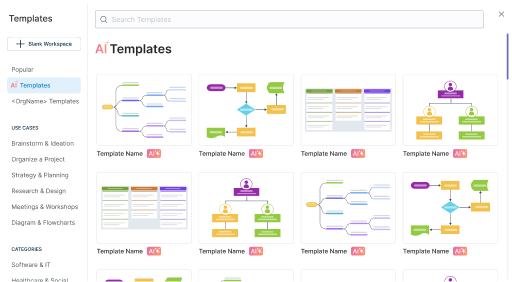
A wide variety of templates for users to bring their processes to life.
We always have this problem of having an idea but cannot expand on it. It’s essentially a “we don’t know where to start” problem.
Here’s where Creately’s impressive suite of diagramming tools shines.
With approximately 70 types of diagramming standards and over 1000 specially designed shapes and connectors, it can support rapid, efficient diagramming. The variety here is tremendous.
While we’ve messed around with the software, we do hope that Creately will periodically add more templates because we can see from their mock-ups, that they truly have an innovative bone.
Seamless Visual Collaboration
A collaborative online environment has been on the rise ever since COVID-19.
Through the pandemic, remote teams have spread across different locations and Creately’s accommodative features for remote work are stellar.
We absolutely adore its quality-of-life features like permission settings, a robust commenting system, and real-time activity tracking through visible cursors.
On paper, this all might seem a little “extra” for software, but quality-of-life features like these ensure smooth and effective collaboration.
Visual Project Management
When it comes to visualising complex ideas, Creately also excels.
Intricate concepts are always present in corporate environments. Turning them digestible and allowing users to personalise their projects makes these ideas less of a headache.
This creative flexibility means each project becomes uniquely its own, enhancing both understanding and presentation.
Impeccable Task Management
Managing daily tasks has never been easier. Creately’s “My Tasks” view helps organize tasks with deadlines with clarity and simplicity.
Imagine having a massive number of pending tasks flooded on your screen—that’s a no-no.
Having the front face of your task management software cluttered with information is nauseating.
We love how users are allowed to immediately get what they want with just a simple search instead of navigating through a large number of clicks in this software.
Businesses That Work Best With Creately
Frankly, we can see Creately being great everywhere.
Still, we have to admit, that its features do have a bigger impact on certain industries that we believe can bring out the best in what Creately offers.
IT and Businesses
The IT industry revolves around complex data management, and Creately makes this easier.
Its capability to create clear visualisations for intricate IT processes, such as cloud architecture is highly sought after in the IT sphere.
Using Creately, we can transform complex information into byte-sized pieces, making it comprehensible for both IT and non-IT people (us included, so thank you, Creately).
Marketing and Sales
Marketing campaigns involve numerous layers like budgeting, strategy, and creative planning.
There are a good number of templates offered by Creately, tailored for detailed campaign mapping.
With the convenience of importing CSV files and integrating them with CRM platforms, it can easily streamline marketing and sales efforts, ensuring a seamless workflow.
Production and Manufacturing
Logistics are notoriously complex, especially on a large scale. Creately helps visualize supply planning and inventory processes.
Using its tools, we can gain a comprehensive view of our logistics operations, making it easier to identify and correct potential issues.
Human Resource Management

With Creately, you can create a perfectly detailed organizational chart to give you a clear map of your company’s human resources.
As companies grow, managing each employee individually becomes challenging. Creately supports us through digital workplace management by tracking KPIs, OKRs, and daily tasks efficiently.
Its templates help map out career progression and competencies, simplifying task assignments and promotion decisions based on an employee’s skills.
The Good And The Not-So-Good

Earlier, we were extremely objective with the core features of Creately. Now, we want to talk more about how we personally feel using the software.
Do note that this is a little more subjective as this is from our perspective. If you are looking for perfect accuracy, you’ll ultimately have to use the software yourself.
What we loved:
- Minimalistic Design and Very Approachable
Creately’s minimalist approach makes planning comfortable despite its complexity. It was pleasing to our eyes. The clean, visual-centric interface allowed us to manage a lot of information without feeling overwhelmed. Its simplicity and seamless usability stand out. - Multipurpose and Has a Bit of Everything
Maybe having functionalities could be overwhelming for some but we’ve found them to be great to use. Whether for task management, data organization, or campaign planning, the platform proves versatile enough for our scale of operations. - Professional Templates Are Readily Available
The availability of professional templates is a significant advantage. Sometimes when we’re stuck in a rut, these templates can be sources of inspiration, kickstarting creativity and streamlining the planning process. - Awesome Compatibility
Creately is compatible with most modern operating systems, including Windows and macOS—our office uses both of them. Plus, their web and mobile options are extremely seamless, ensuring almost no issues with navigation. Having various co-workers trying out the software, they really appreciate this smooth operational experience.
A Few Minor Setbacks:
- Cancelling Can Be a Hassle
We did this as an experiment because we have come across many users experiencing this issue, and down the road, we might need to cancel as well. It’s true, cancelling the service can be cumbersome as it requires emailing. This process is quite time-consuming, which might not be convenient for users wanting a quicker cancellation method. - Requires Paid Version For Full Experience
The first time around, we tried using the unpaid version of the software because we didn’t know what we were jumping into. There, quite a number of features are locked behind a paywall, necessitating a subscription for full access. After using the paid version, we noticed the difference between the two versions is pretty jarring. - Does Not Have A Dedicated App
Perhaps we’re a little nit-picky here. As tech lovers, we were lowkey bummed out due to the absence of a dedicated app for Creately. Don’t get us wrong, the software works amazingly on browsers, but sometimes, we just have so many browser tabs open, that it gets inconvenient to have an extra one.
What Is Creately Bringing To The Table?

One of Creately’s best standout features is its ability to sync and import data from other platforms.
As a consumer, business owners, and a smart buyer, we always looking for something new in a seemingly “ordinary” product. So it’s only fair from a user perspective to question the software’s uniqueness.
Creately offers a unique approach to handling complex tasks and raw data. Often, data and tasks can be overwhelming and difficult to interpret. Visual tools make these elements more understandable and accessible, easing the business processes significantly. By converting abstract data into visual formats, Creately helps users grasp concepts quickly.
With features like mind maps, flowcharts, and diagrams, you can brainstorm and plan with unmatched clarity. These tools help in organizing thoughts, making the ideation process smooth and efficient.
Another amazing selling point is being able to make friends with other tools. Creately can link up with Google Drive, Slack, and other popular software. This ensures all your workspaces are connected and consistent.
The result? A more streamlined and cohesive workflow.
Price Comparison With Other Collaborative Platforms
When it comes to pricing, Creately leans more towards the premium side. Many other collaborative platforms like Miro, Lucidchart, and Canva offer competitive rates.
However, the range of functionalities Creately provides justifies the cost.
Individual users can access professional-grade templates and unlimited canvases for just $5 per month. This is a remarkable bargain. Miro or Lucidchart, on the other hand, often charge more for similar individual plans without offering as many features.
For businesses, Creately’s Business Plan comes with a steeper price tag. Despite this, the add-ons included in the plan make it worth considering.
To put things into perspective, here’s a straightforward table comparing basic pricing plans:
| Platform | Individual Plan | Business Plan |
| Creately | $5/month | Custom pricing—includes integrationsMonthly -$149 (Unlimited Users)Annually -$1068 (Unlimited Users) |
| Miro | $8/month | Custom pricing—includes integrationsMonthly -$20 per memberAnnually -$16 per member |
| Lucidchart | $7.95/month | $20/month—includes integrations |
| Canva | $6.49/month | $12.99/month—limited integrations |
As illustrated, Creately offers a competitive option for individuals and businesses alike. While some might prefer lower prices from competitors, the additional features and integrations Creately includes provide substantial value for those willing to invest.
User Experience And Ease Of Access
Even with a myriad of options at our disposal, navigating through the software is straightforward and intuitive.
The layout is thoughtfully organized, making it easy to find what we need without feeling overwhelmed.
Different sections and projects are segregated in an orderly manner. This organization makes tracking back to past projects and tasks extremely convenient.
Everything is systematically filed, so we never find ourselves lost or confused looking for a specific document or plan.
Despite the large volume of information, documents, and plans we may store, the interface does not feel sluggish.
Moving around within Creately remains seamless, providing a smooth user experience, which is vital for maintaining productivity.
We also tested Creately with our colleagues who are not tech-savvy. Amazingly, they could operate the software at a basic level without any difficulties.
This shows amazing accessibility—requiring only a few clicks to achieve tasks.
We love how Creately is designed to be accessible within the fewest number of clicks possible. This efficiency greatly enhances our overall experience, ensuring that we can focus more on our projects rather than figuring out the software for hours.
Security And Privacy
When it comes to security and privacy, Creately impresses with a robust infrastructure. All user information is encrypted, protecting data from unauthorized access.
This ensures that sensitive information remains secure while using the platform. This is extremely crucial for professionals handling confidential data.
Creately also performs backups every 24 hours. This regular schedule means that even if something goes wrong, user data can be quickly restored.
We cannot stress how important this is. This significantly minimises potential data loss and downtime. Knowing that our work is continually safeguarded gives us peace of mind.
Furthermore, their privacy policies are clear and transparent. Creately does a commendable job of outlining how user data is handled, stored, and protected.
For businesses and individual users alike, it’s reassuring to know that our information is respected and secure on the platform.
Connecting The World: Creately’s Affiliate Program
Great things are meant to be shared. *wink*
At Creately, they’ve introduced an exclusive affiliate program where users can share a referral link, netting them up to 20% in cash rewards for each purchase made from the link.
Here’s what you can do to get started:
Step 1:
Register an account using this link: https://partners.creately.com/login

Step 2:
Verify your email/account and then fill in the necessary details to complete your profile.

Step 3:
Once you’ve finished your profile, you can proceed by first pressing “Continue to Dashboard” and then the “Finish” button.

Step 4:
Obtain your unique affiliate link and start racking up rewards!

To learn more about the program, you can visit Creately’s affiliate program page here!
Final Verdict
To sum it up, we’re definitely on the positive end when it comes to Creately, largely because we do require a lot of planning for our internal and external operations.
As a program, it screams modernity. The lightweight approach and simplicity in expressing the convoluted is severely underrated, especially when compared to the tools we’ve used previously.
We certainly loved it! If the nature of your work requires large amounts of planning and organising, Creately can well easily be your best virtual partner.


